
Is WordPress Good for Small Business? Here are The Facts
A few years back, a client asked that I help him move to WordPress. Why did he want to move? At the time, he said his website didn’t have features like onsite booking, payment processing and some other modern essential features like that. He was held hostage by an all-in-one outfit that provided a domain name, a basic website, and hosting at a wallet-gouging fee every year. My client’s business was handicapped because of this.
Skeptical, then my client asked: is WordPress good for small business, or are there better platforms?
Short answer: yes and no respectively. WordPress is still the platform I’d put a small business on. Not because it’s trendy. Because you own your stuff and you enjoy a plethora of features and it also comes with a big community support.
Is WordPress good for small business in 2026?
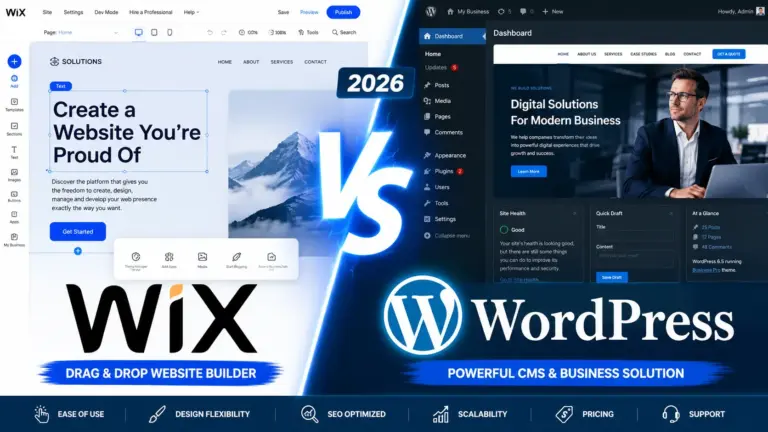
Short answer: yes. When you pick a platform, you’re picking what happens to your site five and ten years from now. That part rarely makes it into the sales page. According to May 2026 data from W3Techs, WordPress powers 42.2% of all websites on the internet and holds close to 60% of the CMS market. For comparison, Shopify sits at around a distant 7% and Wix sits farther at 5%.
If you sell anything online, WooCommerce (the most popular eCommerce engine for WordPress) handles roughly 30% to 38% of all global online stores, processing tens of billions in annual sales. Translation: pretty much every payment processor, shipping app, accounting tool, and marketing platform you might want to plug in already has a WordPress integration sitting on a shelf, tested and waiting. That’s the kind of many features my client was hoping for when he asked “is WordPress good for small business.”
The market share alone should tell you that WordPress is more than capable for small businesses.
The bill, and who actually owns the site
One of the most common pitfalls by small business trying to have website for the first time is misunderstanding the total cost of ownership. Many SaaS (Software as a Service) website builders lure you in with a low monthly introductory rate. However, as your traffic grows and you require more features, such as advanced e-commerce analytics, subscription billing, or localized SEO tools, you are forced into expensive, premium subscription tiers.
Worse, proprietary platforms often charge transaction fees on top of your standard payment gateway fees.
WordPress is open-source software. This means the core operating system is completely free. You only pay for your high-performance web hosting, your domain name, and the specific premium tools you choose to use. You own your data, your customer lists, and your code outright. You are never held hostage. If a hosting provider underperforms or you decide you can get better elsewhere, you can simply pack up your WordPress site and move. You almost cannot do that with closed SaaS builders without losing.
Flexibility, Scalability, and Custom Growth
A website is always never a finished object. It should be something you keep nudging as your business changes. The lead-gen page from year one becomes a blog, then a booking system, then a small storefront, then a client portal. A well-designed WordPress foundation makes that possible without a teardown every time.
Templates are fine for a side project. However, once you’re running operations on the site, you’ll want custom WordPress website development that matches how you actually work — a booking flow tied to your dispatch software, a gated portal for client documents, a quoting tool. WordPress sits underneath all of that quite happily.
If your current site is slow, losing you leads, or lack a modern look that appease potential customers/clients, you should seek affordable wordpress redesign services for small business, which is usually a higher-ROI bet than buying more ads. A redesign done right strips the bloat, fixes the conversion path, and brings the whole thing in line with what people now expect on their phones. When you’re hiring for a custom small business WordPress web design, look for teams that build light. Heavy is easy. Light takes skill.
WordPress is Not Slow
This reputation is fair for sites built in 2016 and not fair for sites built today. The slowness came from people stacking a bloated theme on top of a page builder on top of fifteen plugins that all do similar things. Of course that’s slow.
Modern WordPress in 2026 looks different. Many professionals, including Wpsaul, now build with WordPress native Block Editor (Gutenberg) and lean frameworks like GeneratePress or Kadence, while reaching for third-party Gutenberg editor like GenerateBlocks instead of a heavy page builder. Pair those with LiteSpeed Cache or WP Rocket on a decent host and a WordPress small business site loads in under two seconds without anyone needing to be a wizard about it. Speed is a Google ranking factor now; it’s also the difference between a mobile visitor reading your page and bouncing.
Essential Tools: The Best WordPress Plugins for Business
The official directory has 60,000+ plugins, although, you do not need 60,000 plugins. You probably need about eight. When people ask me which are the best WordPress plugins for business, I tell them to pick one tool per job and stop. Here’s the short list I actually install on most client sites:
- SEO: Rank Math. Cleaner UI than Yoast, schema markup is built in, and the free tier covers most small businesses for years.
- Performance: LiteSpeed Cache if your host runs LiteSpeed (if your host uses LiteSpeed server), otherwise WP Rocket. Don’t run both. People do. Don’t.
- Security: Wordfence or Solid Security. Either is fine. Pick one. Turn on two-factor on every admin account before you do anything else.
- E-Commerce: WooCommerce. Still the obvious choice on WordPress, and you don’t hand over a cut of every sale to the platform.
- Lead capture: FluentForms or Gravity Forms. Conditional logic means your contact page can actually qualify a lead instead of just collecting names.
Most plugin disasters I get called in to fix come from somebody installing five plugins that all promise to do the same thing. Resist it the urge.
Maintenance, security, and the part nobody loves talking about
Yes, WordPress needs updates. Core, themes, plugins – they all ship patches, and ignoring them for a year is how sites get hacked. This is the honest tradeoff for open-source: you (or someone you pay) have to keep the lights on.
The good news is that small business WordPress support is a competitive market. You’re not locked to the agency that built your site. For something like $50 to $200 a month, you can outsource updates, daily backups, and uptime checks to a maintenance plan. That’s a rounding error compared to an in-house IT hire, and it’s cheaper than the cleanup bill after a single compromise.
So, is WordPress Good Enough for Your Small Business?
Yes, undoubtedly. The hosted builders are great for hobby sites and a particular slice of very simple stores. Past that, every limitation you’ll eventually hit – missing integrations, no real data export, design ceilings, all which points back toward open-source. Picking WordPress in 2026 isn’t a tech choice so much as a set of sound WordPress business decisions: you keep ownership, you keep options, and you keep the bill under your control.
Your website should make running your business easier, not harder. WordPress, set up well, gets out of your way.