Webflow vs WordPress: Which One Works for You?
If you’ve been going back and forth between Webflow and WordPress, you’re not alone. It’s one of the most common questions from people who are about to build a website and don’t want to get halfway through the process only to realize they chose the wrong tool.
Both platforms can build beautiful, functional websites. But they serve different people in different situations, and picking the wrong one will cost you your time, money, or both.
Let’s get into it.
What Each Platform Is Actually Built For
WordPress launched in 2003 as a blogging platform. Over two decades, it grew into the most widely used content management system on the internet. It powers a significant share of the web, built on an open-source model where its core code is free to use and modify. That open model gave rise to an enormous plugin ecosystem. Need a contact form? There’s a plugin. Need a membership area? Plugin. SEO tools, site speed optimizers, e-commerce? Plugins, always!
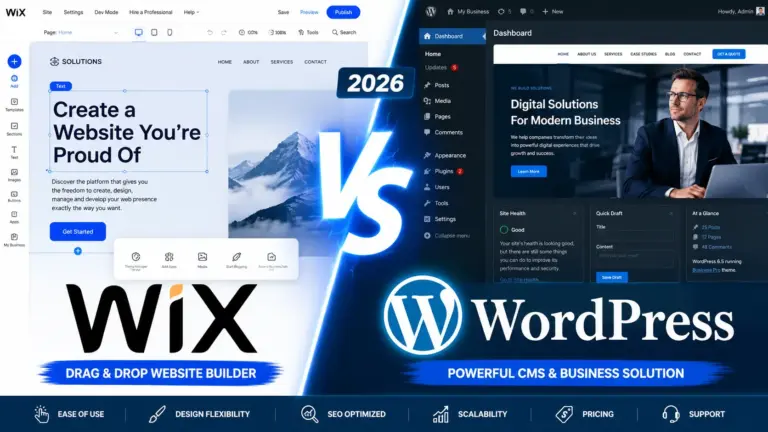
Webflow came along in 2012 with a different idea. Where WordPress separates design, development, and content management across different tools and roles, Webflow consolidates them into one, so designers, developers, and marketers work in the same interface, on the same codebase, without plugin dependencies. The result is a visual-first platform where what you see while building is what actually goes live.
If you ask me, neither is objectively better. They just approach the problem from opposite directions.
The Real Cost Question Nobody Talks About Upfront
Here’s where things get interesting. WordPress is famously “free.” You can download it at no cost, find a free theme, install free plugins, and be up and running for almost nothing.
Except running a WordPress site at any serious standard is almost never free.
Yes, the license cost is zero, but the operating cost, developer time, plugin licenses, hosting infrastructure, performance maintenance, is anything but free.
You’ll need to pay for hosting (quality shared hosting starts around $5–$15/month, managed WordPress hosting can run $30–$100+/month), a premium theme if your free one looks like 2013, and several paid plugins the moment you need anything beyond basic functionality.
Webflow, on the other hand, puts it all on the table from the start. Webflow’s pricing starts at $0/month on its Starter plan, with paid plans going from $14/month (Basic) to $23/month (CMS) to $39/month (Business). Hosting, SSL, and a CDN are baked in. No separate hosting bill, no stacking plugin subscriptions.
If your budget is genuinely tight and you’re comfortable managing the technical side of things, WordPress can be cheaper (check out this article on how you can host your WordPress website for free). For everyone else, the honest comparison is closer than the “WordPress is free” headline suggests.
Design and Build Experience
This is probably where the two platforms feel most different day-to-day.
Webflow gives you a blank canvas. Every element is built, not selected from a template. Figma designs transfer directly into the platform without compromise. Custom interactions, animations, and complex layout systems are built natively without additional plugins, and there are no theme constraints because there is no theme in the first place. If you’ve ever tried to squeeze a Figma design into a WordPress theme and spent three hours fighting the block editor, you’ll understand why that matters.
WordPress’s Gutenberg block editor has improved a lot since its rocky 2018 debut. It’s genuinely usable now. But design freedom is still heavily dependent on the theme and plugins in use, and achieving highly custom UI often requires significant developer time constrained by what the theme architecture allows.
For non-technical users who want pixel-perfect designs, Webflow wins. For users comfortable working within a theme’s structure, or willing to hire a developer who knows WordPress inside out, WordPress still delivers excellent results.
SEO: Both Are Capable, But the Starting Point Differs
Webflow offers built-in SEO tools with options to edit meta titles, descriptions, alt text, and add 301 redirects and an XML sitemap. It also comes with integrated hosting powered by AWS and CDN, built for speed and security. You can start optimizing from day one, no additional setup required.
WordPress offers basic SEO for free with plugins like Yoast Seo and Rankmath. Serious SEO in WordPress requires you to dip your hands into your pocket, which means you can’t optimize properly for SEO from the start without spending. Webflow doesn’t limit you this way.
That said, Yoast or Rank Math are solid SEO setups used by millions of high-ranking websites.
Site speed also plays into SEO, and this is one area where Webflow tends to have a natural edge for less technical users. Because WordPress performance depends on your hosting provider, your theme, and which combination of optimization plugins you’re running, results vary widely. In short, Webflow’s performance is more consistent out of the box.
Plugins vs. Native Features: Freedom or Fragility?
WordPress has over 59,000 plugins. That’s extraordinary reach. Whatever you need, someone has probably built a plugin for it.
But managing those dependencies at enterprise scale creates compounding technical debt. Every plugin update requires QA and regression testing. Version compatibility between core, plugins, and custom code must be continuously managed. When a key plugin is deprecated, acquired, repriced, or breaks after a WordPress core update, the impact can cascade across core functionality.
Most small sites won’t hit this problem badly. But as sites grow and plugin lists expand, it becomes an ongoing maintenance tax.
Webflow built the most commonly needed functionality WordPress plugins provide directly into the platform as native features – SEO tools, form handling, analytics, A/B testing, localization. There are no plugin updates to manage, no compatibility conflicts, and no vendor risk from third-party dependencies.
Less flexibility; fewer headaches. Whether that trade-off works for you depends on what you’re building.
The Learning Curve
Neither platform is trivial to learn, but they’re difficult in different ways.
WordPress has a steeper initial setup but promises a familiar editing experience once you’re past it. The Gutenberg editor is approachable, and because WordPress is so widely used, finding tutorials, documentation, and forums is never hard. If something breaks, someone online has probably encountered the exact same problem.
Webflow has an easier setup process but a genuinely different conceptual model. For users who prefer ease-of-use and modern design without needing extensive technical skills, Webflow is the better fit. For those who want maximum flexibility and are comfortable with the technical aspects, WordPress holds its ground.
Webflow’s own university has free courses that get most people comfortable within a few days. But if you’ve spent years in WordPress and your team already knows it well, retraining has a real cost too.
Which One Is Right for You?
There’s no single answer here, so let’s make it practical.
Webflow tends to work better if:
- You want design control without depending on a developer for every change
- Your team includes designers who want to build, not just hand off files
- You want SEO, hosting, and security handled in one place
- You’re building a portfolio, SaaS marketing site, or agency website
- You’d rather pay a predictable monthly fee than manage a stack of plugins
WordPress tends to work better if:
- You’re running a content-heavy blog or large editorial site
- You need a specific integration or feature that requires a plugin (there are 59,000 of them)
- You’re building a large e-commerce store via WooCommerce
- You have a developer available to manage maintenance and updates
- Cost control matters and you’re willing to do the setup work yourself
The organizations moving away from WordPress aren’t doing so because it stopped working, they’re doing so because the total cost of keeping it working, at the standard a modern website requires, keeps rising.
That doesn’t mean WordPress is the wrong choice. It just means the decision should be made with your eyes open about what each platform actually demands from you.
Final Thought
The Webflow vs WordPress debate often gets framed as “designer tool vs developer tool,” but that’s an oversimplification. Webflow has capable developers using it every day; WordPress has non-technical users managing their own sites just fine.
The better question is: what does your team look like, what do you actually need to build, and how much ongoing maintenance are you willing to handle?
Answer those honestly, and the right platform becomes fairly obvious.
If you’re still not sure, most people find that starting a free Webflow project and spending a few hours in the editor gives them a quicker answer than any article can.